NumPy for algebraic operations
En esta página
import numpy as npIdentity matrix
print(np.identity(4), "\n --- ") # Creates a 4x4 identity matrix
print(np.eye(4), "\n --- ") # Same as np.identity(4)

# np.identity calls np.eye with k=0. np.eye allows creating matrices with ones on the diagonal shifted
print(np.eye(4, k=1), "\n --- ") # Creates a 4x4 matrix with ones on the diagonal shifted by 1
[[1. 0. 0. 0.] [0. 1. 0. 0.] [0. 0. 1. 0.] [0. 0. 0. 1.]] --- [[1. 0. 0. 0.] [0. 1. 0. 0.] [0. 0. 1. 0.] [0. 0. 0. 1.]] --- [[0. 1. 0. 0.] [0. 0. 1. 0.] [0. 0. 0. 1.] [0. 0. 0. 0.]] ---
Transpose matrix
A = np.array([[1, 2, 3], [4, 5, 6]])
print(A)
print(A.T) # Transpose of A (swaps rows and columns)
[[1 2 3] [4 5 6]] [[1 4] [2 5] [3 6]]
# Certain slice access operations on a matrix can be facilitated using the transpose:
print(A[:,1]) # Column 1
print(A.T[1]) # Row 1 of the transpose = column 1
[2 5] [2 5]
Matrix operations
Matrix operations with scalars
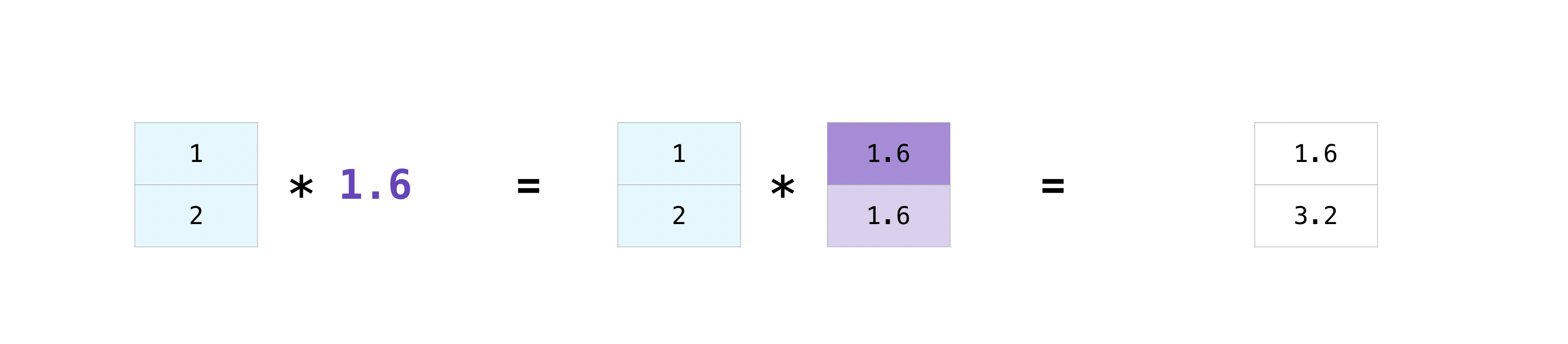
Arithmetic operations can be applied to a matrix and a scalar. The scalar is applied to each element of the matrix.
print(f"A=\n{A}")

print(f"A+3 =\n {A+3}") # Adds 3 to each element of A
print(f"A-3 =\n {A-3}") # Subtracts 3 from each element of A
print(f"A*2 =\n {A*2}") # Multiplies each element of A by 2
print(f"A/2 =\n {A/2}") # Divides each element of A by 2
print(f"A**2 =\n {A**2}") # Squares each element of A
print(f"A**0.5 =\n {A**.5}") # Square root of each element of A (raises to 1/2)
print(f"√.5 =\n {np.sqrt(A)}") # Square root of each element of A
A= [[1 2 3] [4 5 6]] A+3 = [[4 5 6] [7 8 9]] A-3 = [[-2 -1 0] [ 1 2 3]] A*2 = [[ 2 4 6] [ 8 10 12]] A/2 = [[0.5 1. 1.5] [2. 2.5 3. ]] A**2 = [[ 1 4 9] [16 25 36]] A**0.5 = [[1. 1.41421356 1.73205081] [2. 2.23606798 2.44948974]] √.5 = [[1. 1.41421356 1.73205081] [2. 2.23606798 2.44948974]]
Element-wise operations
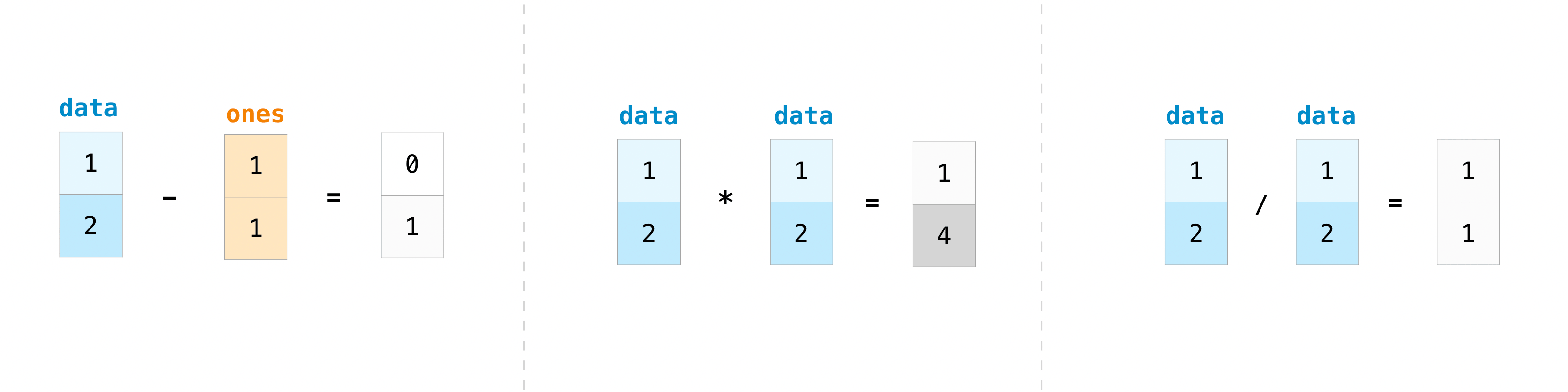
You can add, subtract, multiply or divide all elements of two matrices, each with its corresponding element.
X = np.identity(2, dtype=int)
print(f"X =\n{X}")
Y = np.array([[1, 2], [3, 4]])
print(f"Y =\n{Y}")
print("---")
print(f"X + Y =\n{X + Y}") # Matrix addition
print(f"X - Y =\n{X - Y}") # Matrix subtraction
print(f"X * Y =\n{X * Y}") # Element-wise product
print(f"X/Y =\n{X/Y}") # Element-wise division
X = [[1 0] [0 1]] Y = [[1 2] [3 4]] --- X + Y = [[2 2] [3 5]] X - Y = [[ 0 -2] [-3 -3]] X * Y = [[1 0] [0 4]] X/Y = [[1. 0. ] [0. 0.25]]
Matrix multiplication (matrix product)
Matrix multiplication consists of multiplying each row of the first matrix by each column of the second matrix, summing the results and placing the result in the corresponding position of the resulting matrix.
This example is from Khan Academy, where you can find explanations of this process from scratch.
It is important not to confuse matrix multiplication with element-wise multiplication.
Matrix multiplication is a vitally important operation in computing. It is used in image processing, machine learning, cryptography, data compression, simulation of physical systems, solving systems of linear equations, etc.
X = np.array([[1, 7], [2, 4]]); print(f"X =\n{X}")
Y = np.array([[3, 3], [5, 2]]); print(f"Y =\n{Y}")
print("---")
print(f"X @ Y =\n{X @ Y}") # Matrix product
X = [[1 7] [2 4]] Y = [[3 3] [5 2]] --- X @ Y = [[38 17] [26 14]]